Your team
Add people, give each one their own numbers and voicemail, and decide which records they see.
In the dashboard, open Team. Each person gets their own login, numbers, voicemail and DataSift records.
Roles
- Owner: runs the account and billing, and sees everything.
- Lead manager: sees everything by default and can change number setups.
- Caller: dials and works their own records.
Add a person
- Click Add a person.
- Enter their name and email, and pick their role: Lead manager or Caller. Each person is a seat.
- They get an email to set their password, then sign in on their iPhone and in Chrome.
Which records they see
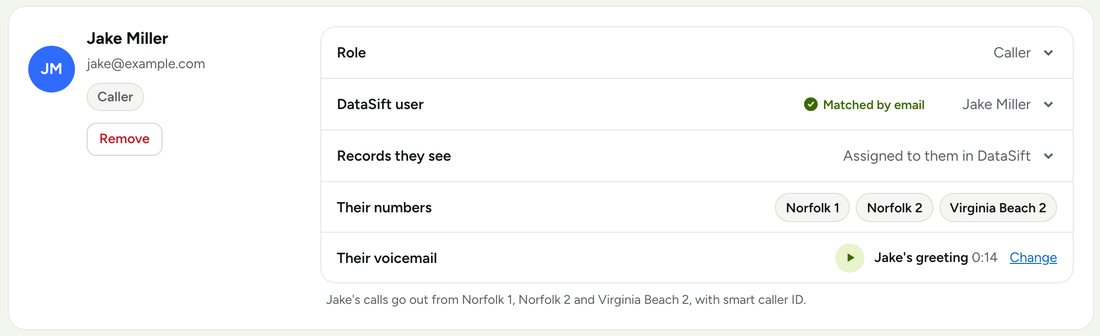
HandRaise reads Assigned To from DataSift. On each card, Records they see is either: - Assigned to them in DataSift: a caller sees the same folders you do, with only their records in them. - Everything: every record in the folders.
Reassign a record in DataSift and it moves to that person's folders in HandRaise. Records with nobody assigned stay with the owner.
DataSift user matches each person to their DataSift login by email. If the emails differ, pick the right one from the list.
Their numbers and voicemail
A person's numbers are the ones that ring them. Set that in Numbers. Their calls go out from their own numbers. Each person can record their own voicemail greeting on their card.
Who has the seat
Your plan comes with one seat. Use it yourself, or give it to your caller and run things from the dashboard. Without a seat, the owner's login still sees everything but can't call or text. Turn it back on any time with Who has the seat.
Ask the help chat in your dashboard, or reach our team and we'll sort it out.