Help center · Get started
Home and your daily goals
What the Home screen shows, and how to set how many dials you're going for each day.
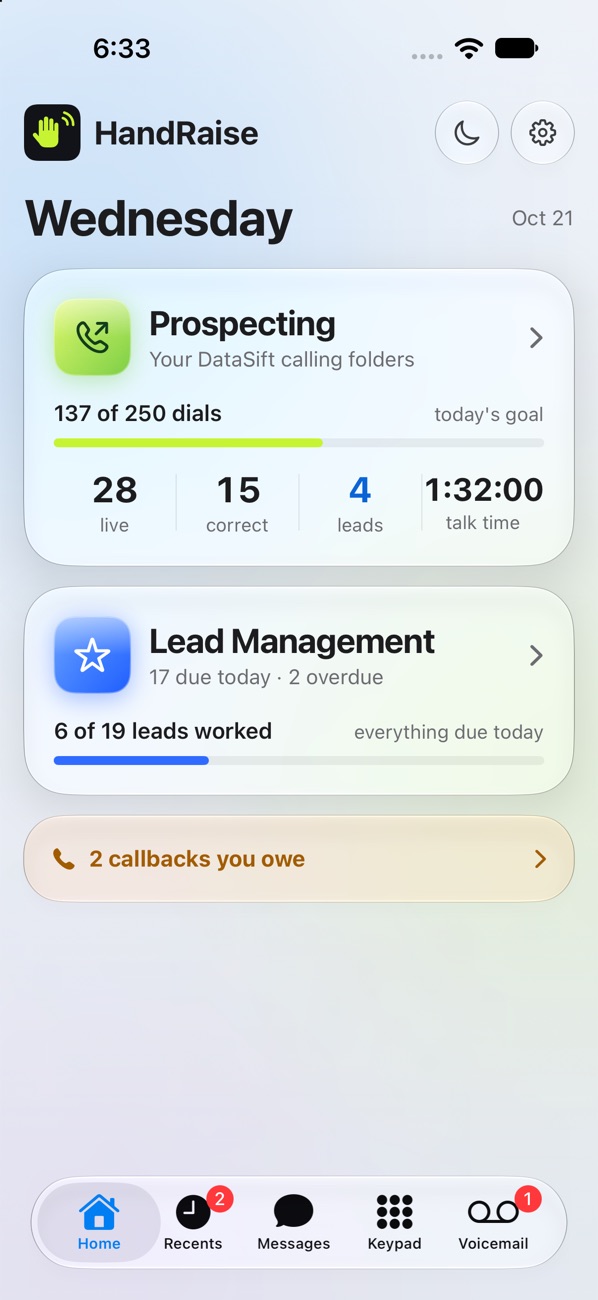
Home is your day at a glance.
- Prospecting shows your dials against today's goal, plus live answers, correct numbers, leads and talk time. Tap it to start dialing.
- Lead Management shows how many leads are due today and how many are overdue. Tap it to work them.
- Called you back shows sellers who called and reached nobody, newest first. Tap the green phone to call them back.
- A bar at the bottom shows missed calls and calls still waiting for a wrap-up.
Set your daily goals
- Open Settings, then Daily goals.
- Type your dials for each day of the week. Leave a day empty for a day off.
- Under leads, pick a number to hit each day, or All due to go for everything due today.
Your goals are the same on the iPhone and in Chrome. Change them in one place and the other follows.
Each person on your team has their own goals. Changing yours never changes anyone else's.
Still stuck?
Ask the help chat in your dashboard, or reach our team and we'll sort it out.