Help center · Calling
HandRaise IQ signal bars
What the bars and scores on each number mean, how they change, and how to skip weak numbers.
Every number gets a score from 0 to 100 for how much the line has been used this past year. The bars show it at a glance, like the signal on your phone.
| Bars | Score | What it means |
|---|---|---|
| 4 bars | 81 to 100 | Line used all year |
| 3 bars | 61 to 80 | Used most of the year |
| 2 bars | 41 to 60 | Used now and then |
| 1 bar | 21 to 40 | Barely used |
| No bars | 0 to 20 | Likely disconnected |
A red Litigator tag means the number belongs to someone known to sue over calls. HandRaise never dials or texts it.
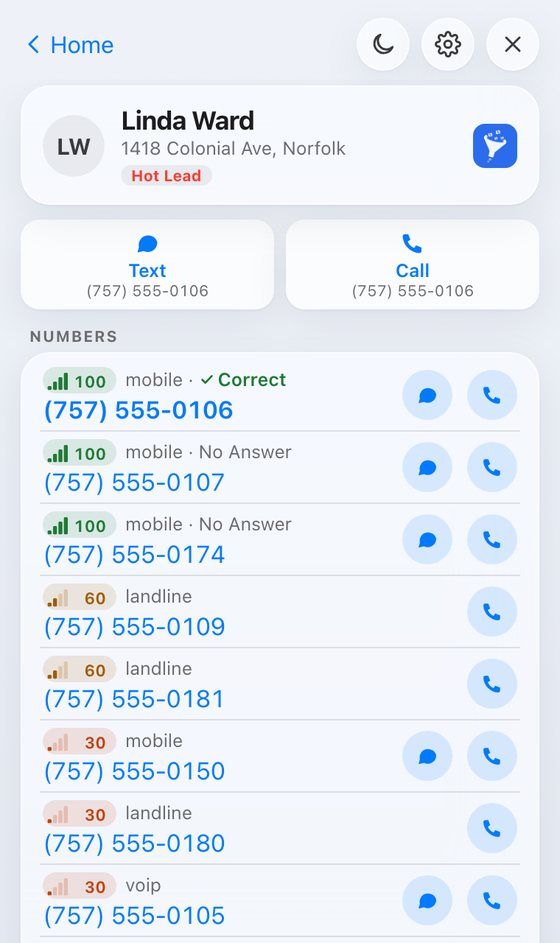
Scores learn from your calls
- A pickup raises a number's score.
- A wrong or dead number drops it to zero.
- A no answer doesn't count against a number. Plenty of good lines just didn't pick up that time.
Tap any score to see what the levels mean and how often your own cold calls picked up at each level.
Skip weak numbers
- Open Settings.
- Find Skip numbers under and pick 4 bars, 3 bars, 2 bars, 1 bar or Don't skip.
The dialer skips numbers under that level. The default is 3 bars.
Still stuck?
Ask the help chat in your dashboard, or reach our team and we'll sort it out.