Help center · Calling
Call waiting
A seller calls while you're on another call. Hang up and answer, or send them to voicemail.
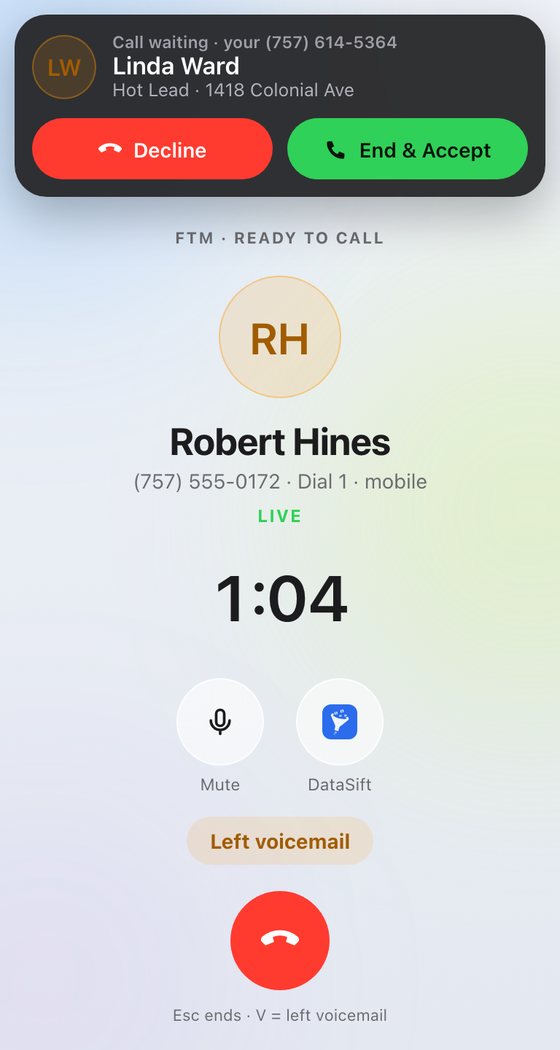
When a second call comes in while you're on one, you'll hear a soft double beep and see a Call waiting banner with the caller's name and their record, if they're in your CRM.
- End & Accept (green) hangs up your current call and answers the new one.
- Decline (red) sends them to voicemail. Your call keeps going.
Good to know
- The dialer never starts the next call while someone is waiting.
- If you end the call that was a dial, its result screen waits for you after the new call.
- On the iPhone, when it's locked or you're in another app, iOS shows its own call waiting screen.
- A third caller goes straight to voicemail.
Still stuck?
Ask the help chat in your dashboard, or reach our team and we'll sort it out.